Ritesh Ghosh

Aniwatch API







Important
- https://api-aniwatch.onrender.com is only meant to demo the API and has rate-limiting enabled to minimize bandwidth consumption. It is recommended to deploy your own instance for personal use by customizing the API as you need it to be.
- This API is just an unofficial API for hianime.to and is in no other way officially related to the same.
- The content that this API provides is not mine, nor is it hosted by me. These belong to their respective owners. This API just demonstrates how to build an API that scrapes websites and uses their content.
Table of Contents
- Installation
- Configuration
- Host your instance
- Documentation
- GET Anime Home Page
- GET Anime A-Z List
- GET Anime Qtip Info
- GET Anime About Info
- GET Search Results
- GET Search Suggestions
- GET Producer Animes
- GET Genre Animes
- GET Category Animes
- GET Estimated Schedules
- GET Anime Episodes
- GET Anime Next Episode Schedule
- GET Anime Episode Servers
- GET Anime Episode Streaming Links
- Development
- Contributors
- Thanks
- Support
- License
- Star History
💻 Installation
Local
-
Clone the repository and move into the directory.
git clone https://github.com/ghoshRitesh12/aniwatch-api.git cd aniwatch-api -
Install all the dependencies.
npm i #or yarn install or pnpm i -
Start the server!
npm start #or yarn start or pnpm startNow the server should be running on http://localhost:4000
Docker
The Docker image is available at The GitHub Container Registry.
Run the following commands to pull and run the docker image.
docker run -d --name aniwatch-api -p 4000:4000 ghcr.io/ghoshritesh12/aniwatch
The above command will start the server on port 4000. You can access the server at http://localhost:4000, and you can also change the port by changing the -p option to -p <port>:4000.
The -d flag runs the container in detached mode, and the --name flag is used to name the container that's about to run.
⚙️ Configuration
Custom HTTP Headers
Currently this API supports parsing of only one custom header, and more may be implemented in the future to accommodate varying needs.
X-ANIWATCH-CACHE-EXPIRY: this custom header is used to specify the cache expiration duration in seconds (defaults to 60 if the header is missing). TheANIWATCH_API_REDIS_CONN_URLenv is required for this custom header to function as intended; otherwise, there's no point in setting this custom header.
Environment Variables
More info can be found in the .env.example file, where envs' having a value that is contained within < > angled brackets, commented out or not, are just examples and should be replaced with relevant ones.
ANIWATCH_API_PORT: port number of the aniwatch API.ANIWATCH_API_WINDOW_MS: duration to track requests for rate limiting (in milliseconds).ANIWATCH_API_MAX_REQS: maximum number of requests in theANIWATCH_API_WINDOW_MStime period.ANIWATCH_API_CORS_ALLOWED_ORIGINS: allowed origins, separated by commas and no spaces in between.ANIWATCH_API_VERCEL_DEPLOYMENT: required for distinguishing Vercel deployment from other ones; set it to true or any other non-zero value.ANIWATCH_API_HOSTNAME: set this to your api instance's hostname to enable rate limiting, don't have this value if you don't wish to rate limit.ANIWATCH_API_REDIS_CONN_URL: this env is optional by default and can be set to utilize Redis caching functionality. It has to be a valid connection URL; otherwise, the Redis client can throw unexpected errors.ANIWATCH_API_S_MAXAGE: specifies the maximum amount of time (in seconds) a resource is considered fresh when served by a CDN cache.ANIWATCH_API_STALE_WHILE_REVALIDATE: specifies the amount of time (in seconds) a resource is served stale while a new one is fetched.
⛅ Host your instance
Caution
For personal deployments:
- If you want to have rate limiting in your application, then set the
ANIWATCH_API_HOSTNAMEenv to your deployed instance's hostname; otherwise, don't set or have this env at all. If you set this env to an incorrect value, you may face other issues.- It's optional by default, but if you want to have endpoint response caching functionality, then set the
ANIWATCH_API_REDIS_CONN_URLenv to a valid Redis connection URL. If the connection URL is invalid, the Redis client can throw unexpected errors.- Remove the if block from the
server.tsfile, spanning from lines 61 to 85.
Vercel
Deploy your own instance of Aniwatch API on Vercel.
Note
When deploying to vercel, set an env named
ANIWATCH_API_VERCEL_DEPLOYMENTtotrueor any non-zero value, but this env must be present.
Render
Deploy your own instance of Aniwatch API on Render.

📚 Documentation
The endpoints exposed by the api are listed below with examples that uses the Fetch API, but you can use any http library.
GET Anime Home Page
GET Anime Home PageEndpoint
/api/v2/hianime/home
Request Sample
const resp = await fetch("/api/v2/hianime/home");
const data = await resp.json();
console.log(data);
Response Schema
{
  success: true,
  data: {
    genres: ["Action", "Cars", "Adventure", ...],
    latestEpisodeAnimes: [
      {
        id: string,
        name: string,
        poster: string,
        type: string,
        episodes: {
          sub: number,
          dub: number,
        }
      },
      {...},
    ],
    spotlightAnimes: [
      {
        id: string,
        name: string,
        jname: string,
        poster: string,
        description: string,
        rank: number,
        otherInfo: string[],
        episodes: {
          sub: number,
          dub: number,
        },
      },
      {...},
    ],
    top10Animes: {
      today: [
        {
          episodes: {
            sub: number,
            dub: number,
          },
          id: string,
          name: string,
          poster: string,
          rank: number
        },
        {...},
      ],
      month: [...],
      week: [...]
    },
    topAiringAnimes: [
      {
        id: string,
        name: string,
        jname: string,
        poster: string,
      },
      {...},
    ],
    topUpcomingAnimes: [
      {
        id: string,
        name: string,
        poster: string,
        duration: string,
        type: string,
        rating: string,
        episodes: {
          sub: number,
          dub: number,
        }
      },
      {...},
    ],
    trendingAnimes: [
      {
        id: string,
        name: string,
        poster: string,
        rank: number,
      },
      {...},
    ],
    mostPopularAnimes: [
      {
        id: string,
        name: string,
        poster: string,
        type: string,
        episodes: {
          sub: number,
          dub: number,
        }
      },
      {...},
    ],
    mostFavoriteAnimes: [
      {
        id: string,
        name: string,
        poster: string,
        type: string,
        episodes: {
          sub: number,
          dub: number,
        }
      },
      {...},
    ],
    latestCompletedAnimes: [
      {
        id: string,
        name: string,
        poster: string,
        type: string,
        episodes: {
          sub: number,
          dub: number,
        }
      },
      {...},
    ],
  }
}
GET Anime A-Z List
GET Anime A-Z ListEndpoint
/api/v2/hianime/azlist/{sortOption}?page={page}
Path Parameters
| Parameter | Type | Description | Required? | Default |
|---|---|---|---|---|
sortOption |
string | The az-list sort option. Possible values include: "all", "other", "0-9" and all english alphabets . | Yes | -- |
Query Parameters
| Parameter | Type | Description | Required? | Default |
|---|---|---|---|---|
page |
number | The page number of the result. | No | 1 |
Request Sample
const resp = await fetch("/api/v2/hianime/azlist/0-9?page=1");
const data = await resp.json();
console.log(data);
Response Schema
{
  success: true,
  data: {
    sortOption: "0-9",
    animes: [
      {
        id: string,
        name: string,
        jname: string,
        poster: string,
        duration: string,
        type: string,
        rating: string,
        episodes: {
          sub: number ,
          dub: number
        }
      },
      {...}
    ],
    totalPages: 1,
    currentPage: 1,
    hasNextPage: false
  }
}
GET Anime Qtip Info
GET Anime Qtip InfoEndpoint
/api/v2/hianime/qtip/{animeId}
Query Parameters
| Parameter | Type | Description | Required? | Default |
|---|---|---|---|---|
animeId |
string | The unique anime id (in kebab case). | Yes | -- |
Request Sample
const resp = await fetch("/api/v2/hianime/qtip/one-piece-100");
const data = await resp.json();
console.log(data);
Response Schema
{
  success: true,
  data: {
    anime: {
      id: "one-piece-100",
      name: "One Piece",
      malscore: string,
      quality: string,
      episodes: {
        sub: number,
        dub: number
      },
      type: string,
      description: string,
      jname: string,
      synonyms: string,
      aired: string,
      status: string,
      genres: ["Action", "Adventure", "Comedy", "Drama", "Fantasy", "Shounen", "Drama", "Fantasy", "Shounen", "Fantasy", "Shounen", "Shounen", "Super Power"]
    }
  }
}
GET Anime About Info
GET Anime About InfoEndpoint
/api/v2/hianime/anime/{animeId}
Query Parameters
| Parameter | Type | Description | Required? | Default |
|---|---|---|---|---|
animeId |
string | The unique anime id (in kebab case). | Yes | -- |
Request Sample
const resp = await fetch("/api/v2/hianime/anime/attack-on-titan-112");
const data = await resp.json();
console.log(data);
Response Schema
{
  success: true,
  data: {
    anime: [
      info: {
        id: string,
        name: string,
        poster: string,
        description: string,
        stats: {
          rating: string,
          quality: string,
          episodes: {
            sub: number,
            dub: number
          },
          type: string,
          duration: string
        },
        promotionalVideos: [
          {
            title: string | undefined,
            source: string | undefined,
            thumbnail: string | undefined
          },
          {...},
        ],
        characterVoiceActor: [
          {
            character: {
              id: string,
              poster: string,
              name: string,
              cast: string
            },
            voiceActor: {
              id: string,
              poster: string,
              name: string,
              cast: string
            }
          },
          {...},
        ]
      }
      moreInfo: {
        aired: string,
        genres: ["Action", "Mystery", ...],
        status: string,
        studios: string,
        duration: string
        ...
      }
    ],
    mostPopularAnimes: [
      {
        episodes: {
          sub: number,
          dub: number,
        },
        id: string,
        jname: string,
        name: string,
        poster: string,
        type: string
      },
      {...},
    ],
    recommendedAnimes: [
      {
        id: string,
        name: string,
        poster: string,
        duration: string,
        type: string,
        rating: string,
        episodes: {
          sub: number,
          dub: number,
        }
      },
      {...},
    ],
    relatedAnimes: [
      {
        id: string,
        name: string,
        poster: string,
        duration: string,
        type: string,
        rating: string,
        episodes: {
          sub: number,
          dub: number,
        }
      },
      {...},
    ],
    seasons: [
      {
        id: string,
        name: string,
        title: string,
        poster: string,
        isCurrent: boolean
      },
      {...}
    ]
  }
}
GET Search Results
GET Search ResultsEndpoint
# basic example
/api/v2/hianime/search?q={query}&page={page}

# advanced example
/api/v2/hianime/search?q={query}&page={page}&genres={genres}&type={type}&sort={sort}&season={season}&language={sub_or_dub}&status={status}&rated={rating}&start_date={yyyy-mm-dd}&end_date={yyyy-mm-dd}&score={score}
Query Parameters
| Parameter | Type | Description | Required? | Default |
|---|---|---|---|---|
q |
string | The search query, i.e. the title of the item you are looking for. | Yes | -- |
page |
number | The page number of the result. | No | 1 |
type |
string | Type of the anime. eg: movie |
No | -- |
status |
string | Status of the anime. eg: finished-airing |
No | -- |
rated |
string | Rating of the anime. eg: r+ or pg-13 |
No | -- |
score |
string | Score of the anime. eg: good or very-good |
No | -- |
season |
string | Season of the aired anime. eg: spring |
No | -- |
language |
string | Language category of the anime. eg: sub or sub-&-dub |
No | -- |
start_date |
string | Start date of the anime(yyyy-mm-dd). eg: 2014-10-2 |
No | -- |
end_date |
string | End date of the anime(yyyy-mm-dd). eg: 2010-12-4 |
No | -- |
sort |
string | Order of sorting the anime result. eg: recently-added |
No | -- |
genres |
string | Genre of the anime, separated by commas. eg: isekai,shounen |
No | -- |
Tip
For both
start_dateandend_date, year must be mentioned. If you wanna omit date or month specify0instead. Eg: omitting date -> 2014-10-0, omitting month -> 2014-0-12, omitting both -> 2014-0-0
Request Sample
// basic example
const resp = await fetch("/api/v2/hianime/search?q=titan&page=1");
const data = await resp.json();
console.log(data);

// advanced example
const resp = await fetch(
    "/api/v2/hianime/search?q=girls&genres=action,adventure&type=movie&sort=score&season=spring&language=dub&status=finished-airing&rated=pg-13&start_date=2014-0-0&score=good"
);
const data = await resp.json();
console.log(data);
Response Schema
{
  success: true,
  data: {
    animes: [
      {
        id: string,
        name: string,
        poster: string,
        duration: string,
        type: string,
        rating: string,
        episodes: {
          sub: number,
          dub: number,
        }
      },
      {...},
    ],
    mostPopularAnimes: [
      {
        episodes: {
          sub: number,
          dub: number,
        },
        id: string,
        jname: string,
        name: string,
        poster: string,
        type: string
      },
      {...},
    ],
    currentPage: 1,
    totalPages: 1,
    hasNextPage: false,
    searchQuery: string,
    searchFilters: {
      [filter_name]: [filter_value]
      ...
    }
  }
}
GET Search Suggestions
GET Search SuggestionsEndpoint
/api/v2/hianime/search/suggestion?q={query}
Query Parameters
| Parameter | Type | Description | Required? | Default |
|---|---|---|---|---|
q |
string | The search suggestion query. | Yes | -- |
Request Sample
const resp = await fetch("/api/v2/hianime/search/suggestion?q=monster");
const data = await resp.json();
console.log(data);
Response Schema
{
  success: true,
  data: {
    suggestions: [
      {
        id: string,
        name: string,
        poster: string,
        jname: string,
        moreInfo: ["Jan 21, 2022", "Movie", "17m"]
      },
      {...},
    ]
  }
}
GET Producer Animes
GET Producer AnimesEndpoint
/api/v2/hianime/producer/{name}?page={page}
Path Parameters
| Parameter | Type | Description | Required? | Default |
|---|---|---|---|---|
name |
string | The name of anime producer (in kebab case). | Yes | -- |
Query Parameters
| Parameter | Type | Description | Required? | Default |
|---|---|---|---|---|
page |
number | The page number of the result. | No | 1 |
Request Sample
const resp = await fetch("/api/v2/hianime/producer/toei-animation?page=2");
const data = await resp.json();
console.log(data);
Response Schema
{
  success: true,
  data: {
    producerName: "Toei Animation Anime",
    animes: [
      {
        id: string,
        name: string,
        poster: string,
        duration: string,
        type: string,
        rating: string,
        episodes: {
          sub: number,
          dub: number,
        }
      },
      {...},
    ],
    top10Animes: {
      today: [
        {
          episodes: {
            sub: number,
            dub: number,
          },
          id: string,
          name: string,
          poster: string,
          rank: number
        },
        {...},
      ],
      month: [...],
      week: [...]
    },
    topAiringAnimes: [
      {
        episodes: {
          sub: number,
          dub: number,
        },
        id: string,
        jname: string,
        name: string,
        poster: string,
        type: string
      },
      {...},
    ],
    currentPage: 2,
    totalPages: 11,
    hasNextPage: true
  }
}
GET Genre Animes
GET Genre AnimesEndpoint
/api/v2/hianime/genre/{name}?page={page}
Path Parameters
| Parameter | Type | Description | Required? | Default |
|---|---|---|---|---|
name |
string | The name of anime genre (in kebab case). | Yes | -- |
Query Parameters
| Parameter | Type | Description | Required? | Default |
|---|---|---|---|---|
page |
number | The page number of the result. | No | 1 |
Request Sample
const resp = await fetch("/api/v2/hianime/genre/shounen?page=2");
const data = await resp.json();
console.log(data);
Response Schema
{
  success: true,
  data: {
    genreName: "Shounen Anime",
    animes: [
      {
        id: string,
        name: string,
        poster: string,
        duration: string,
        type: string,
        rating: string,
        episodes: {
          sub: number,
          dub: number,
        }
      },
      {...},
    ],
    genres: ["Action", "Cars", "Adventure", ...],
    topAiringAnimes: [
      {
        episodes: {
          sub: number,
          dub: number,
        },
        id: string,
        jname: string,
        name: string,
        poster: string,
        type: string
      },
      {...},
    ],
    currentPage: 2,
    totalPages: 38,
    hasNextPage: true
  }
}
GET Category Animes
GET Category AnimesEndpoint
/api/v2/hianime/category/{name}?page={page}
Path Parameters
| Parameter | Type | Description | Required? | Default |
|---|---|---|---|---|
category |
string | The category of anime. | Yes | -- |
Query Parameters
| Parameter | Type | Description | Required? | Default |
|---|---|---|---|---|
page |
number | The page number of the result. | No | 1 |
Request Sample
// categories -> "most-favorite", "most-popular", "subbed-anime", "dubbed-anime", "recently-updated", "recently-added", "top-upcoming", "top-airing", "movie", "special", "ova", "ona", "tv", "completed"

const resp = await fetch("/api/v2/hianime/category/tv?page=2");
const data = await resp.json();
console.log(data);
Response Schema
{
  success: true,
  data: {
    category: "TV Series Anime",
    animes: [
      {
        id: string,
        name: string,
        poster: string,
        duration: string,
        type: string,
        rating: string,
        episodes: {
          sub: number,
          dub: number,
        }
      },
      {...},
    ],
    genres: ["Action", "Cars", "Adventure", ...],
    top10Animes: {
      today: [
        {
          episodes: {
            sub: number,
            dub: number,
          },
          id: string,
          name: string,
          poster: string,
          rank: number
        },
        {...},
      ],
      month: [...],
      week: [...]
    },
    currentPage: 2,
    totalPages: 100,
    hasNextPage: true
  }
}
GET Estimated Schedules
GET Estimated SchedulesEndpoint
/api/v2/hianime/schedule?date={date}
Query Parameters
| Parameter | Type | Description | Required? | Default |
|---|---|---|---|---|
date |
string | The date of the desired schedule in the following format: (yyyy-mm-dd). | Yes | -- |
Request Sample
const resp = await fetch("/api/v2/hianime/schedule?date=2024-06-09");
const data = await resp.json();
console.log(data);
Response Schema
{
  success: true,
  data: {
    scheduledAnimes: [
      {
        id: string,
        time: string, // 24 hours format
        name: string,
        jname: string,
        airingTimestamp: number,
        secondsUntilAiring: number
      },
      {...}
    ]
  }
}
GET Anime Episodes
GET Anime EpisodesEndpoint
/api/v2/hianime/anime/{animeId}/episodes
Path Parameters
| Parameter | Type | Description | Required? | Default |
|---|---|---|---|---|
animeId |
string | The unique anime id. | Yes | -- |
Request Sample
const resp = await fetch("/api/v2/hianime/anime/steinsgate-3/episodes");
const data = await resp.json();
console.log(data);
Response Schema
{
  success: true,
  data: {
    totalEpisodes: 24,
    episodes: [
      {
        number: 1,
        title: "Turning Point",
        episodeId: "steinsgate-3?ep=213"
        isFiller: false,
      },
      {...}
    ]
  }
}
GET Anime Next Episode Schedule
GET Anime Next Episode ScheduleEndpoint
/api/v2/hianime/anime/{animeId}/next-episode-schedule
Path Parameters
| Parameter | Type | Description | Required? | Default |
|---|---|---|---|---|
animeId |
string | The unique anime id. | Yes | -- |
Request Sample
const resp = await fetch(
    "/api/v2/hianime/anime/steinsgate-3/next-episode-schedule"
);
const data = await resp.json();
console.log(data);
Response Schema
{
  success: true,
  data: {
    airingISOTimestamp: string | null,
    airingTimestamp: number | null,
    secondsUntilAiring: number | null
  }
}
GET Anime Episode Servers
GET Anime Episode ServersEndpoint
/api/v2/hianime/episode/servers?animeEpisodeId={id}
Query Parameters
| Parameter | Type | Description | Required? | Default |
|---|---|---|---|---|
animeEpisodeId |
string | The unique anime episode id. | Yes | -- |
Request Sample
const resp = await fetch(
    "/api/v2/hianime/episode/servers?animeEpisodeId=steinsgate-0-92?ep=2055"
);
const data = await resp.json();
console.log(data);
Response Schema
{
  success: true,
  data: {
    episodeId: "steinsgate-0-92?ep=2055",
    episodeNo: 5,
    sub: [
      {
        serverId: 4,
        serverName: "vidstreaming",
      },
      {...}
    ],
    dub: [
      {
        serverId: 1,
        serverName: "megacloud",
      },
      {...}
    ],
    raw: [
      {
        serverId: 1,
        serverName: "megacloud",
      },
      {...}
    ]
  }
}
GET Anime Episode Streaming Links
GET Anime Episode Streaming LinksEndpoint
/api/v2/hianime/episode/sources?animeEpisodeId={id}?server={server}&category={dub || sub || raw}
Query Parameters
| Parameter | Type | Description | Required? | Default |
|---|---|---|---|---|
animeEpisodeId |
string | The unique anime episode id. | Yes | -- |
server |
string | The name of the server. | No | "hd-1" |
category |
string | The category of the episode ('sub', 'dub' or 'raw'). | No | "sub" |
Request Sample
const resp = await fetch(
    "/api/v2/hianime/episode/sources?animeEpisodeId=steinsgate-3?ep=230&server=hd-1&category=dub"
);
const data = await resp.json();
console.log(data);
Response Schema
{
  success: true,
  data: {
    headers: {
      Referer: string,
      "User-Agent": string,
      ...
    },
    sources: [
      {
        url: string, // .m3u8 hls streaming file
        isM3U8: boolean,
        quality?: string,
      },
      {...}
    ],
    subtitles: [
      {
        lang: "English",
        url: string, // .vtt subtitle file
      },
      {...}
    ],
    anilistID: number | null,
    malID: number | null
  }
}
👨💻 Development
Pull requests and stars are always welcome. If you encounter any bug or want to add a new feature to this api, consider creating a new issue. If you wish to contribute to this project, read the CONTRIBUTING.md file.
✨ Contributors
Thanks to the following people for keeping this project alive and relevant.
🤝 Thanks
🙌 Support
Don't forget to leave a star 🌟. You can also follow me on X (Twitter) @riteshgsh.
📜 License
This project is licensed under the MIT License - see the LICENSE file for more details.
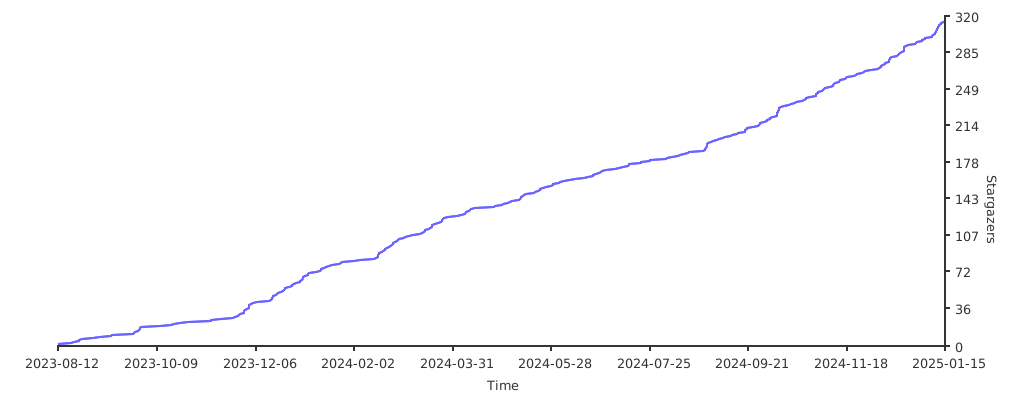
🌟 Star History